 kerms
0e2f8c4828
kerms
0e2f8c4828

|
||
|---|---|---|
| .. | ||
| assets | ||
| lib_esptools-js | ||
| EspFlasher.vue | ||
| README.md | ||
| web-serial.d.ts | ||
README.md
ESP Flasher Component
A Vue 3 component for flashing ESP32 series microcontrollers directly from the browser using the Web Serial API. This component is based on esptools-js.
Demo
Live Demo - Wireless UART DIY Guide
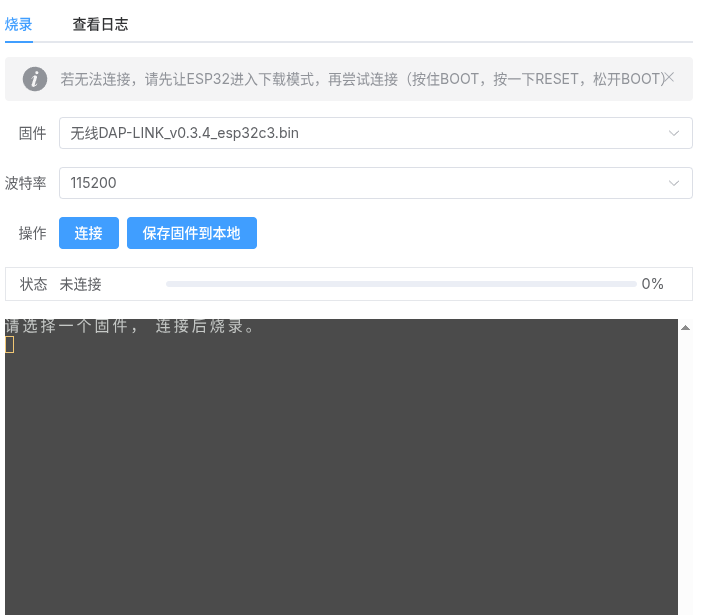
Features
- Supports ESP32, ESP32-C3, ESP32-S3, and more.
- Built-in Xterm.js terminal for progress and logging.
- Support for multiple firmware image options.
- Dark mode support via prop.
Usage
Props
| Prop | Type | Description |
|---|---|---|
imageOptions |
ImageOption[] |
An array of firmware images available for flashing. |
isDark |
boolean |
(Optional) Toggle dark mode for the terminal. |
ImageOption Object
type ImageOption = {
  value: string;  // Display name of the firmware
  link: string;   // Path/URL to the .bin file
  target: string; // Target chip (e.g., 'ESP32-C3', 'ESP32', 'ESP32-S3')
};
Example
<script setup lang="ts">
import EspFlasher from './path/to/yunsi-toolbox/esp-flasher/EspFlasher.vue';
import { ref } from 'vue';

const isDark = ref(false);

const imageOptions = [
  {
    value: 'MyFirmware_v1.0_esp32c3.bin',
    link: '/downloads/firmware_c3.bin',
    target: 'ESP32-C3',
  },
  {
    value: 'MyFirmware_v1.0_esp32s3.bin',
    link: '/downloads/firmware_s3.bin',
    target: 'ESP32-S3',
  }
];
</script>

<template>
  <EspFlasher :imageOptions="imageOptions" :isDark="isDark" />
</template>
Dependencies
vuextermxterm-addon-fitcrypto-js
Credits
This tool uses a modified version of esptools-js.